Migration guide
Migrate from Mantle to Lunvo and keep the same data
Switching from Mantle to Lunvo takes a few minutes and no code change. You connect your Shopify Partner account, add the App IDs you tracked in Mantle, and Lunvo pulls the same revenue and merchant data straight from the Shopify Partner API. This guide walks through the three onboarding steps.
To migrate from Mantle to Lunvo, connect your Shopify Partner account (Partner org ID and Partner API token), then add each Shopify App ID you want to track. Lunvo resyncs the same revenue, MRR, installs, uninstalls and merchant data you saw in Mantle, because both read from the Shopify Partner API. No code change and no re-instrumentation are required.
- 1
Connect your Shopify Partner account
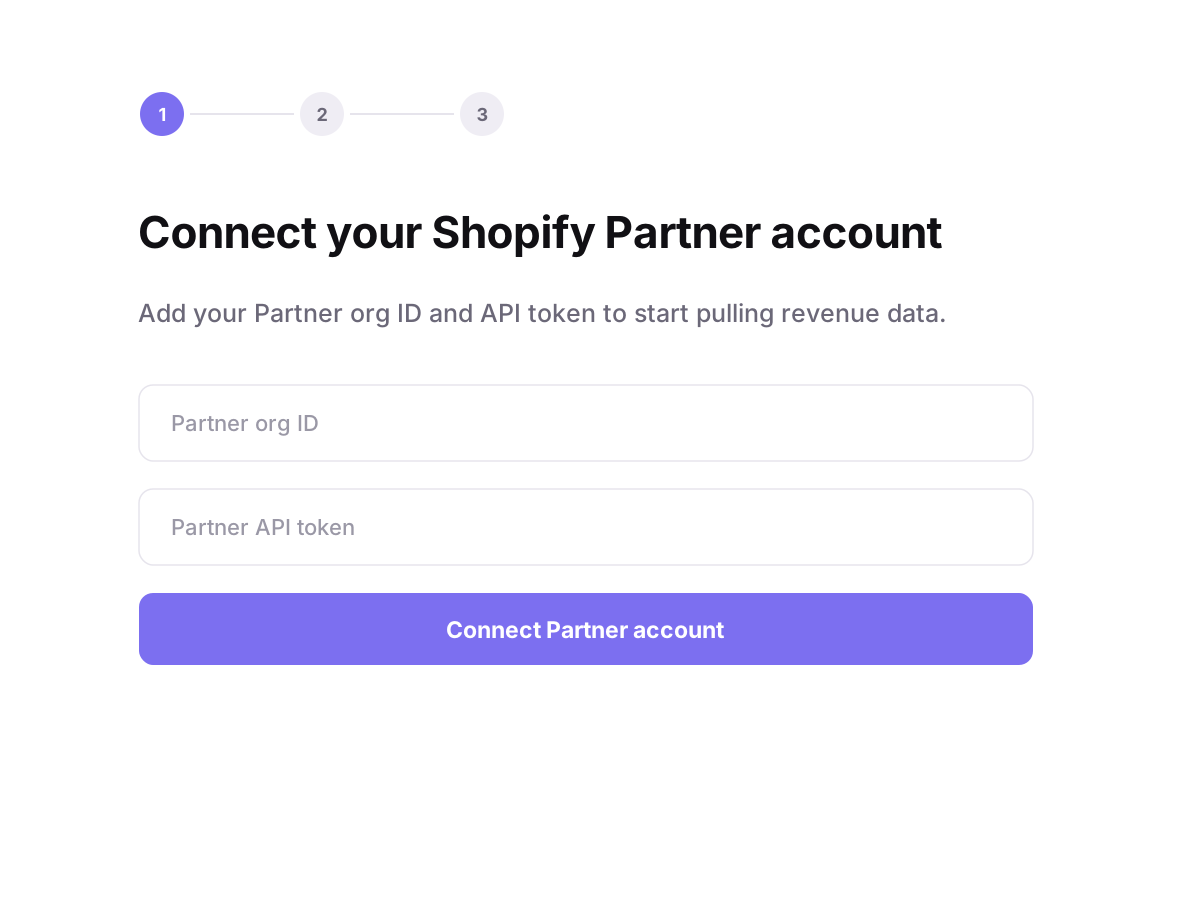
On step 1 of onboarding, paste your Partner org ID and your Partner API token, then click Connect Partner account. Your org ID is the number in your Shopify Partner dashboard URL (partners.shopify.com/<org-id>), and you generate the API token under Settings, then Partner API clients in that same dashboard. This is the only credential Lunvo needs to start pulling revenue data.
- 2
Add your first app
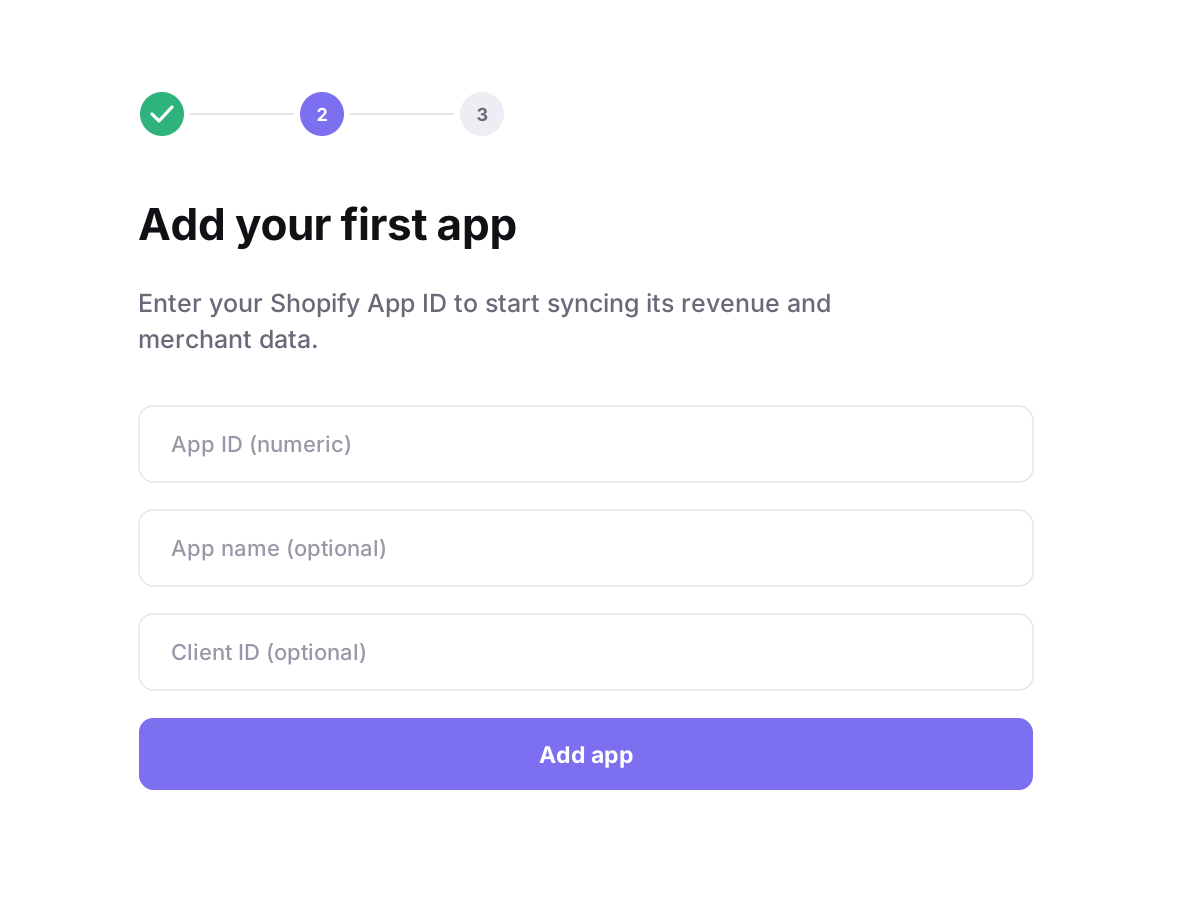
On step 2, enter the numeric App ID of the app you tracked in Mantle, then click Add app. App name and Client ID are optional and only help you label the app. Repeat this step for every app you want to sync. The App ID is the number in your app URL in the Partner dashboard (apps/<app-id>).
- 3
Find the same data you had in Mantle
Once an app is connected, Lunvo backfills its history from the Partner API and keeps it in sync. You get the same numbers you watched in Mantle: gross and net revenue, MRR with expansion and churn, installs and uninstalls, and your merchant list. Because Mantle and Lunvo both read the Partner API, the figures line up, so there is nothing to export or re-import by hand.
See also
FAQ
How do I migrate from Mantle to Lunvo?
Connect your Shopify Partner account in Lunvo with your Partner org ID and Partner API token, then add each Shopify App ID you want to track. Lunvo handles the rest and starts syncing revenue and merchant data automatically.
Will I get the same data I had in Mantle?
Yes. Lunvo reads the same Shopify Partner API that Mantle used, so your revenue, MRR, installs, uninstalls and merchant data match what you saw in Mantle. The numbers are the same because the source is the same.
Where do I find my Partner org ID and App ID?
Your Partner org ID is the number in your Shopify Partner dashboard URL (partners.shopify.com/<org-id>). Generate the Partner API token under Settings, then Partner API clients. Each App ID is the number in that app's URL in the Partner dashboard (apps/<app-id>).
How long does the migration take?
A few minutes. Connecting your Partner account and adding your App IDs takes about a minute, then Lunvo backfills your history in the background.
Is my historical data imported?
Yes. When you add an app, Lunvo backfills its history from the Shopify Partner API, so your past revenue and events appear in the dashboard, not just data from today onward.
Do I need to change any code to switch from Mantle?
No. Lunvo reads your data from the Shopify Partner API, so there is nothing to re-instrument. You only paste your Partner credentials and App IDs.
Move from Mantle to Lunvo, free during early access
Lunvo is built for Shopify app developers and pulls the same data Mantle did, so switching is a drop-in change, not a project. Connect your Partner account and your numbers are back in minutes.
Free during early access, no credit card needed.